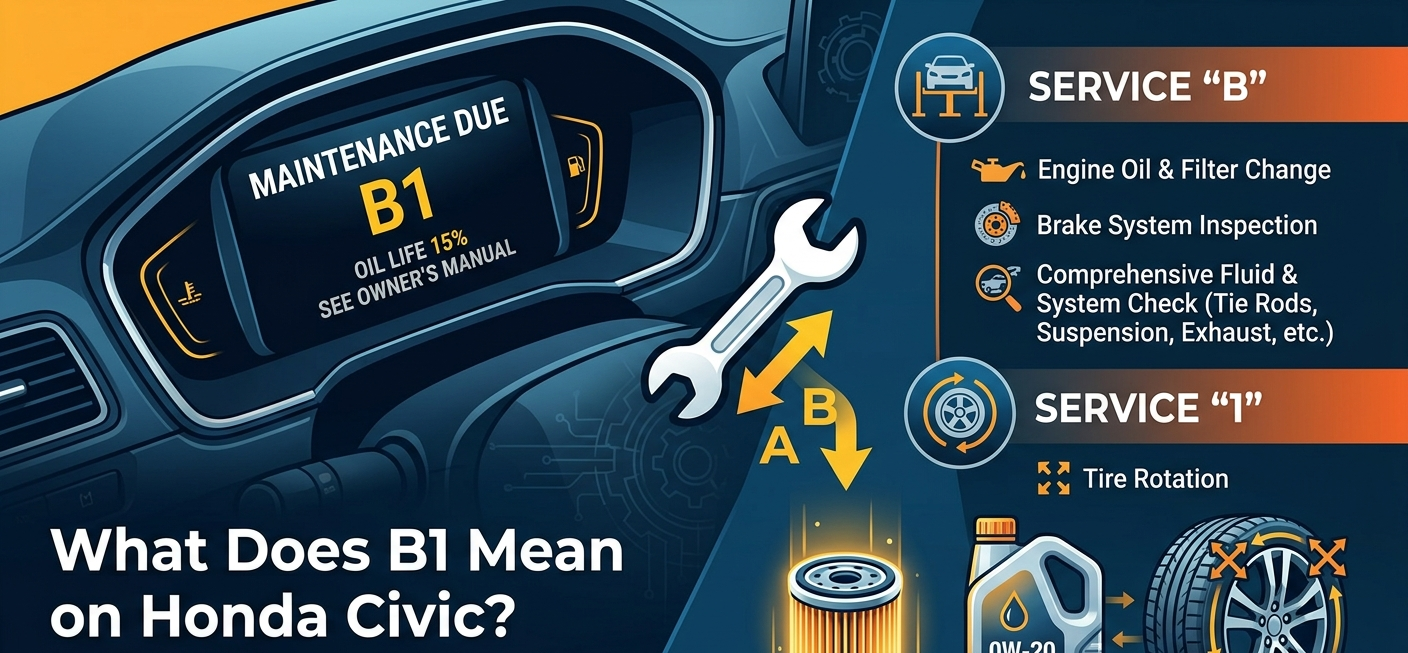
Your dashboard just lit up with “B1” here’s exactly what it means, what it costs, and whether you really need the dealer.
Decoding the Honda B1 Service Code
Honda’s Maintenance Minder is a smart system built into your Civic’s computer. Instead of using a fixed mileage schedule, it watches how you actually drive tracking engine heat, cold starts, and trip length then tells you exactly when service is due. When it shows “B1,” it’s combining two separate codes into one message.
Internal links: Link to other Civic Maintenance posts on revcivic.com
What the “B” Stands For (Beyond the Oil Change)
| Quick tip:The “B” service is sometimes called an oil change, but it’s closer to a 30-minute wellness check for your whole car. Don’t skip the inspection items. |
The letter “B” triggers a full service visit not just a quick oil top-up. Here’s what’s included:
- Engine oil and filter replacement the main item
- Brake inspection pad thickness, rotor condition, and fluid level
- Parking brake check
- Tie rod, steering gear box, and boot inspection
- Suspension components looking for wear or damage
- Driveshaft boots on front-wheel-drive models
- All fluid levels coolant, power steering, and brake fluid
- Exhaust system visual inspection
What the “1” Stands For (The Importance of Tire Rotation)
The number “1” means it’s time to rotate your tires. On a front-wheel-drive Civic (most models), the front tires wear much faster than the rear they handle steering and most of the braking force. Regular rotation evens out that wear and can add 10,000–15,000 miles to the life of a full set.
A proper rotation also gives a technician a chance to spot uneven wear patterns an early sign of alignment or suspension issues before they become expensive problems.
Estimated B1 Service Costs in 2026 (USA Data)
Prices vary by region, but here’s a solid benchmark for what you should expect to pay this year across the country.
Dealership vs. Independent Mechanic vs. DIY
| The Warranty Gap — what competitors miss:If your Civic is still under Honda’s factory warranty, you do NOT have to go to the dealer for oil changes. Under the Magnuson-Moss Warranty Act, any licensed shop can perform B1 service. Just keep your receipts. A written record showing the correct oil spec (0W-20 full synthetic for most 11th-gen Civics) protects your warranty just as well as a dealer stamp. |
| Service Option | Estimated Cost | Notes |
| Honda Dealership | $180 – $250 | OEM parts, certified techs, loaner cars often available |
| Independent Shop | $120 – $170 | Same quality at lower labor rates |
| DIY (parts only) | $60 – $80 | Saves $100–$150; requires basic tools and 1–2 hrs |
B1 vs. A1: Key Differences Every Civic Owner Should Know
These two codes are easy to mix up. Here’s a side-by-side breakdown:
| Service Item | A1 Code | B1 Code |
| Oil & filter change | Yes | Yes |
| Tire rotation | Yes (“1”) | Yes (“1”) |
| Full mechanical inspection | No | Yes |
| Brake system check | No | Yes |
| Fluid levels inspection | No | Yes |
| Typical cost (dealer) | $80 – $120 | $180 – $250 |
| Typical interval | ~5,000 miles | ~7,500 – 10,000 miles |
Bottom line: A1 is a lighter service. B1 is the full visit — it’s roughly twice the cost because twice the work is done.
Community Insights: Why Is Your B1 Light On?
Oil Life vs. Actual Mileage
One of the most common Reddit questions about the Civic Maintenance Minder is: “Why did my B1 light come on at only 4,000 miles? My last car needed an oil change every 5,000.”
Here’s the answer: Honda’s algorithm doesn’t just count miles. It tracks engine load and temperature cycles. Every cold start in winter, every short trip where the engine never fully warms up, and every hard-acceleration moment uses up oil life faster than highway cruising. So if you do a lot of city driving, school runs, or short errands, 4,000 miles might genuinely be the right time for your specific driving habits.
Extreme Driving Conditions and the Maintenance Minder
| Don’t ignore it:The Maintenance Minder is calibrated to catch real-world wear. If it says it’s time, it’s time waiting another 2,000 miles is exactly the habit the system is designed to correct. |
Honda classifies certain driving patterns as “severe service.” If you regularly do any of the following, expect your B1 alert to appear earlier than average:
- Trips under 5 miles, especially in cold weather
- Towing or hauling heavy loads
- Idling for long periods (commutes with lots of stop-and-go traffic)
- Driving in dusty or off-road conditions
- Temperatures consistently below 32°F or above 90°F
How to Perform a DIY B1 Service (Save $150+)
This is a weekend-afternoon job for most people with basic mechanical comfort.
Required Tools and Supplies
- 0W-20 full synthetic oil (4.4 qt)
- Honda OEM oil filter (or Fram/Bosch equivalent)
- 17mm drain plug wrench
- Oil filter wrench
- Drain pan
- Floor jack + 2 jack stands
- Torque wrench
- Lug wrench & wheel chocks
- Shop rags
Step-by-Step Oil and Filter Change
- Warm the engine for 2–3 minutes, then shut it off. Warm oil drains faster and more completely than cold.
- Raise the front of the car with a floor jack and secure on jack stands. Never work under a car supported only by a jack.
- Locate the drain plug under the engine. Place your drain pan underneath and remove the plug with a 17mm socket. Let oil drain fully (5–10 minutes).
- Remove the old oil filter. Lightly coat the rubber gasket on the new filter with fresh oil before installing.
- Reinstall the drain plug. Honda spec is 29 ft-lb with a torque wrench — overtightening strips the threads.
- Add 4.4 quarts of 0W-20 full synthetic through the top fill cap. Check the dipstick.
- Run the engine for 1 minute, check for leaks, then recheck oil level.
How to Rotate Your Tires Correctly
| Check tire pressure too:Honda recommends 32–35 PSI for most Civic trims. Under-inflated tires wear the edges, defeating the purpose of a fresh rotation. |
For a front-wheel-drive Civic, the standard pattern is the forward cross:
- Front-left → Rear-left (straight back, same side)
- Front-right → Rear-right (straight back, same side)
- Rear-left → Front-right (cross to opposite side)
- Rear-right → Front-left (cross to opposite side)
Torque lug nuts to 80 ft-lb in a star pattern. Re-torque after driving 50 miles.
How to Reset the Honda Civic Maintenance Minder Light
Once service is done, the light won’t turn itself off you need to reset it manually.
- Turn the ignition to ON (don’t start the engine, or press the start button twice without the brake pedal).
- Use the steering wheel buttons to navigate to the Maintenance Minder screen in the instrument display.
- Press and hold the SEL/RESET button for about 10 seconds until the display blinks.
- Confirm the reset when prompted. The oil life indicator should return to 100%.
- Turn the car off and back on. The B1 indicator should be gone.
The exact steps vary slightly between 2016–2021 (10th gen) and 2022–2026 (11th gen) Civics. Check your owner’s manual (typically page 3-22 in US editions) if your display looks different.
Avoid Dealership Upselling: What You Don’t Need
| Rule of thumb:If it’s not in the Maintenance Minder code and not in your owner’s manual schedule, ask for the Honda TSB that recommends it before you say yes. |
B1 service gives service advisors an opening to suggest extras. Some are legitimate. Many are not. Here’s what to decline with confidence:
- Engine air filter flush at 15,000 miles Honda says every 30,000 miles or when visibly dirty. Check it yourself first.
- Fuel injector cleaning Not needed unless you have a specific driveability complaint.
- Transmission fluid “top-off” at every B service Honda CVT fluid only needs changing around 90,000 miles under normal use.
- Tire balance with every rotation Balance when you feel vibration at highway speeds, not on a schedule.
- Overpriced cabin air filter A $15 part you can swap yourself in 5 minutes under the glove box.
Plan Your Maintenance with Ease
| Plan Your Maintenance with EaseDon’t guess your maintenance costs. Use our specialized tool to see exactly what’s due and how much you should be paying.[ Calculate My Civic Maintenance Cost ] → revcivic.com |
Frequently Asked Questions (FAQs)
How urgent is B1 service can I drive a few more weeks?
You have about 500–1,000 miles of buffer once the light appears. Driving significantly past that risks running low-quality oil through your engine. Schedule it within 2 weeks if possible.
Does B1 service void my warranty if I don’t go to a Honda dealer?
No. Under the Magnuson-Moss Warranty Act, using an independent shop doesn’t void your factory warranty as long as you use the correct oil spec and keep service receipts.
What oil does a Honda Civic take for B1 service?
All 2022–2026 (11th-gen) Civics use 0W-20 full synthetic motor oil. Most 2016–2021 (10th-gen) Civics also use 0W-20. Always confirm with your owner’s manual or the oil filler cap sticker.
My B1 came on at only 4,000 miles. Is something wrong with my car?
Almost certainly not. The Maintenance Minder tracks engine heat cycles and cold starts, not just odometer miles. Lots of short trips and cold-weather driving burn through oil life faster. This is working as designed.
Can I just do the oil change and skip the tire rotation?
You can, but skipping rotation means your front tires will wear unevenly on a FWD Civic. You’ll likely need to replace all four tires earlier — costing far more than a $20–30 rotation.
How do I know if I need B1 or B12 or B123 service?
Each number after the “B” is a separate sub-service. B1 = tire rotation only. B12 = tire rotation + air filters. B123 = all of those plus transmission fluid. Only do what your display’s code calls for.
Conclusion
The B1 alert on your Honda Civic is straightforward once you know the system: “B” is a thorough oil change plus a mechanical inspection, and “1” means your tires need rotating. Together they take about an hour at a shop, or a Saturday morning in your driveway.
Dealer prices in 2026 run $180–$250 for this service. An independent shop brings that to $120–$170. DIY drops it to around $60–$80 in parts. Whatever you choose, keep your receipts — they’re your warranty protection. And when the job’s done, reset the Maintenance Minder so it can start tracking again accurately.
Internal links: Link to other Civic Maintenance posts on revcivic.com