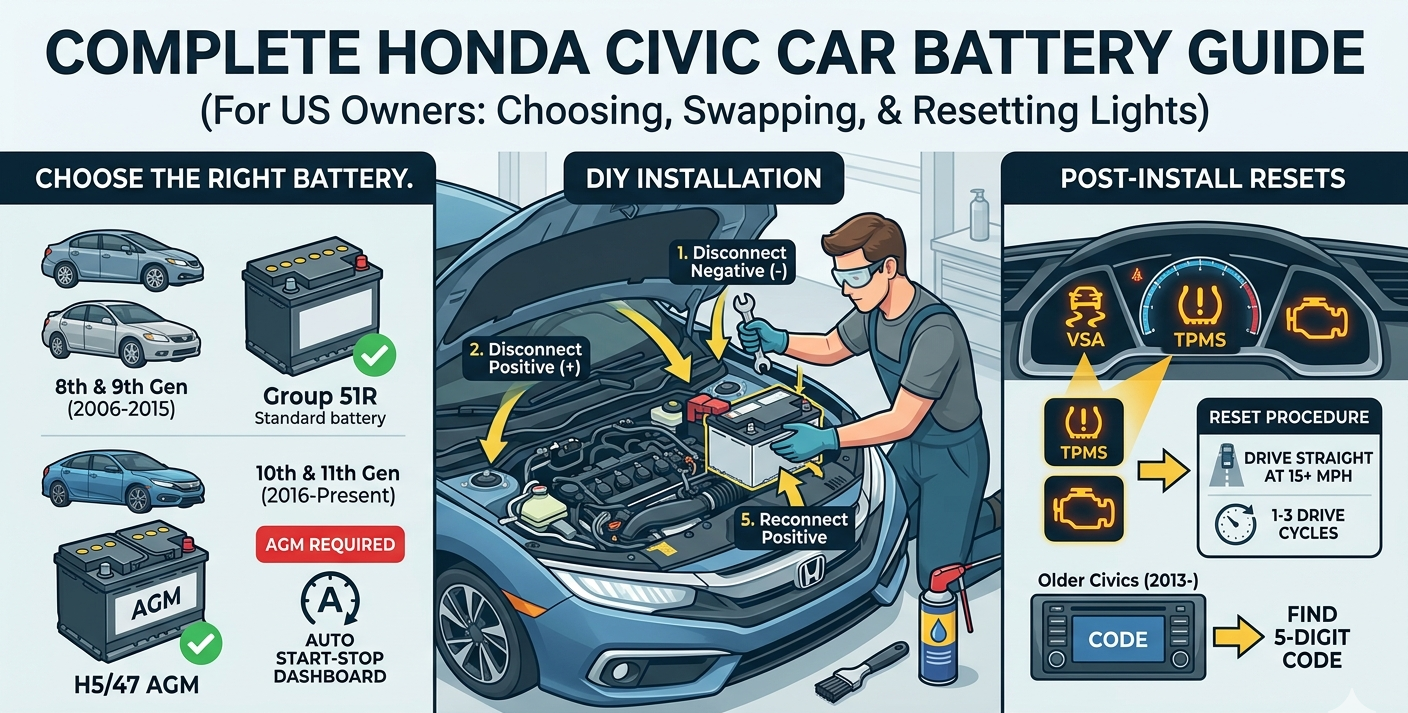
A complete, no-nonsense guide for US Civic owners from picking the right battery to resetting your dashboard lights.
Introduction
If your Honda Civic is turning over slowly, throwing a battery warning light, or dying unexpectedly, you need a new battery. The dealership will charge you $150 to $250 in labor alone to swap one out on top of the cost of the battery. You can do this yourself in about 30 minutes with basic hand tools.
This guide covers everything: which battery your specific Civic actually needs, how to remove and install it correctly, and what to do when your dashboard lights up like a Christmas tree afterward. Follow the steps in order and you will not have any problems.
Tools Required
You do not need a mechanic’s toolkit for this job. Here is what you need:
- 10mm wrench or socket (essential): This is the single most important tool. Nearly every bolt on a Civic battery the terminal clamps and the J-hook tie-down bracket is 10mm. A ratchet with a short extension makes the tie-down bolt much easier.
- Battery terminal brush or baking soda + wire brush: Cleans corrosion off the terminals before you put the new battery in.
- Penetrating oil (PB Blaster or similar): For the J-hook tie-down bolt. These bolts seize with age. Spray them before you start.
- Safety glasses and gloves: Battery acid is not something you want near your eyes.
- Memory saver (optional): A small device that plugs into your OBD-II port and keeps a 12V charge to the car’s computer while the battery is disconnected. Prevents radio code resets on older Civics. Not required, but useful.
- New battery (correct group size see below)
Which Battery Does Your Honda Civic Need?
Using the wrong battery on a newer Civic will cause real electrical problems. Match your generation below before you buy anything.
10th and 11th Generation Civics (2016–Present)
Battery group: H5/47 (AGM required on models with Auto Start-Stop)
WARNING: If your Civic has the Auto Start-Stop feature (the engine shuts off at red lights to save fuel), you MUST use an AGM (Absorbent Glass Mat) battery.
Do not substitute a standard flooded lead-acid battery, even if it fits. The Auto Start-Stop system cycles the engine dozens of times per drive. A standard battery cannot handle that charge/discharge rate and will fail prematurely often within months. It will also trigger battery management system warnings and potentially cause erratic electrical behavior.
How to check if your Civic has Auto Start-Stop: look for a small A with a circular arrow symbol on the dashboard or center console. If it is there, you need AGM. When in doubt, buy AGM anyway it works in all 10th/11th Gen Civics regardless.
8th and 9th Generation Civics (2006–2015)
Battery group: 51R
These Civics use a standard Group 51R flooded lead-acid battery. No special chemistry required. The “R” matters it indicates a reversed terminal layout (positive on the right). A Group 51 without the R will not fit properly.
7th Generation and Older (2005 and Earlier)
Battery group: 51R (most models) verify with your owner’s manual or a parts store lookup.
Step-by-Step: Removal and Installation
Before You Start
Park on a flat surface, turn off the ignition completely, and pop the hood. The battery on a Civic is in the engine bay, toward the driver’s side. Give the J-hook tie-down bolt a generous spray of penetrating oil now and let it soak for 5 to 10 minutes before you touch it. This single step will save you from snapping that bolt off in the bracket.
Removing the Old Battery
- Disconnect the NEGATIVE terminal first. It is the black cable marked with a minus sign (–). Loosen the 10mm clamp bolt and wiggle the cable off the post. Tuck it aside so it cannot accidentally contact the battery.
- Disconnect the POSITIVE terminal second. Red cable, marked with a plus sign (+). Same process loosen, wiggle, set aside.
- Remove the J-hook tie-down bracket. This is the metal bracket at the base of the battery that keeps it from moving. It uses a 10mm bolt. If it resists, apply more penetrating oil and wait. Do not force it. A snapped bolt means a much bigger job.
- Lift the battery straight up and out. Civic batteries are heavy around 30 to 40 lbs. Use both hands and lift with your legs.
- Inspect the battery tray. Wipe out any dirt, corrosion, or acid residue with a damp rag. If there is heavy corrosion (white or blue-green powder), clean it with a baking soda and water solution.
Installing the New Battery
- Set the new battery into the tray. Confirm the positive and negative posts are on the correct sides matching your cables.
- Reinstall the J-hook tie-down bracket. Snug it down firmly with the 10mm bolt. It should not rock or move. Do not overtighten snug is enough.
- Connect the POSITIVE terminal first. Red cable goes on the positive (+) post. Tighten the clamp bolt until the cable does not twist on the post.
- Connect the NEGATIVE terminal second. Black cable on the negative (–) post. Tighten the same way.
- Apply a small amount of battery terminal grease or dielectric grease to both terminals if you have it. This slows future corrosion.
- Start the car. It should crank immediately and start without hesitation.
Terminal Order Summary: Disconnect NEGATIVE first. Reconnect POSITIVE first. This order prevents accidental short circuits against the car’s chassis.
Post-Installation Resets: Don’t Panic
You started the car. The battery is installed correctly. And now your dashboard looks like this:
- VSA (Vehicle Stability Assist) warning light
- TPMS (Tire Pressure Monitoring System) light
- Emissions / Check Engine light
- Power Steering warning (some models)
This is completely normal. Do not take the car back to the dealer. Do not return the battery.
When you disconnect a battery, the car’s computer loses its stored calibration data for several sensors. Those warning lights will stay on until the sensors recalibrate themselves through normal driving.
Steering Angle Sensor (VSA Light) Fix in 2 Minutes
The VSA system relies on a steering angle sensor that needs to know where “straight ahead” is. After a battery disconnect, it loses that reference point.
To recalibrate it: drive the car in a straight line at approximately 15 mph for a short distance a clear, straight section of road works perfectly. Keep the wheel steady and centered. The sensor will recalibrate automatically within a few seconds. The VSA light should turn off shortly after.
TPMS and Emissions Lights
The TPMS light will reset on its own after the car has driven a few miles at highway speed. The system needs time to poll each sensor. If it does not clear within 10 to 15 minutes of driving, check your tire pressures one may actually be low.
An emissions/Check Engine light that appears only after a battery disconnect will almost always clear itself within one to three drive cycles as the car’s OBDII monitors run through their self-tests. A drive cycle means: start the car cold, drive at a mix of city and highway speeds for 20 to 30 minutes, then let it sit and cool. If the light persists beyond three drive cycles, it may indicate a separate, pre-existing issue worth scanning with an OBD reader.
Radio Anti-Theft Code (2013 and Older Civics)
On Civics made before 2013, Honda’s factory radio has an anti-theft feature. When battery power is cut, the radio locks and displays “CODE” on startup.
You need a 5-digit code to unlock it. Here is how to find it:
- Check your glove box Honda often placed a sticker with the code in there when the car was new.
- Look in the owner’s manual pouch for a small card labeled “Radio Code.”
- Call any Honda dealership with your VIN and they can look it up (usually at no charge).
- Use Honda’s online radio code retrieval tool at owners.honda.com if you have the radio serial number.
Once you have the code, enter it using the radio preset buttons. The radio will unlock and work normally. If you used a memory saver device during the battery swap, you will not need to do this at all.
You’re Done
A Civic battery swap is a legitimate DIY job. You saved yourself $150 or more in dealer labor, you know exactly what went into the car, and the whole process took under an hour. Reset the lights as described above and your Civic will drive exactly as it did before.
Most replacement batteries come with a 3-year free replacement warranty. Keep your receipt and note the install date Civic batteries typically last 4 to 6 years under normal conditions.