
Your Honda Civic relies on its battery for a lot more than just starting the engine. It powers your infotainment system, keeps your onboard computer stable, and supports every electronic feature packed into your dashboard.
When that battery starts to fade, a slow crank or a dim dome light is often the first warning sign. Waiting too long can leave you stranded in a parking lot or, worse, on the side of the road.
The good news is that swapping in a new battery is one of the most beginner friendly repairs you can do at home. All it takes is the right battery, a few basic tools, and about twenty minutes of your time.
This guide walks you through everything you need to know about a Honda Civic Group 51R battery change. You will learn why the 51R size matters, how to safely remove and install the new unit, and what to do once the swap is complete.
Why the Group 51R is the Right Fit for Your Honda Civic

Not all batteries that fit in your engine bay are actually meant for your car. Size is only part of the equation. The internal layout matters just as much.
Group 51R is the battery group size that most Honda Civic model years call for. It refers to a specific set of physical dimensions, terminal placement, and case design that matches the battery tray and cable routing in your Civic.
What the “R” Actually Means
The letter R in Group 51R stands for reverse polarity. This tells you where the positive and negative terminals sit on top of the battery case.
On a standard Group 51 battery, the terminals are arranged one way. On a Group 51R battery, that layout is flipped, or reversed, from left to right.
This small detail makes a huge difference once the battery is sitting in your engine bay. Your Civic’s factory cables were designed and cut to reach specific terminal positions.
Why Terminal Position Prevents Cable Stretch
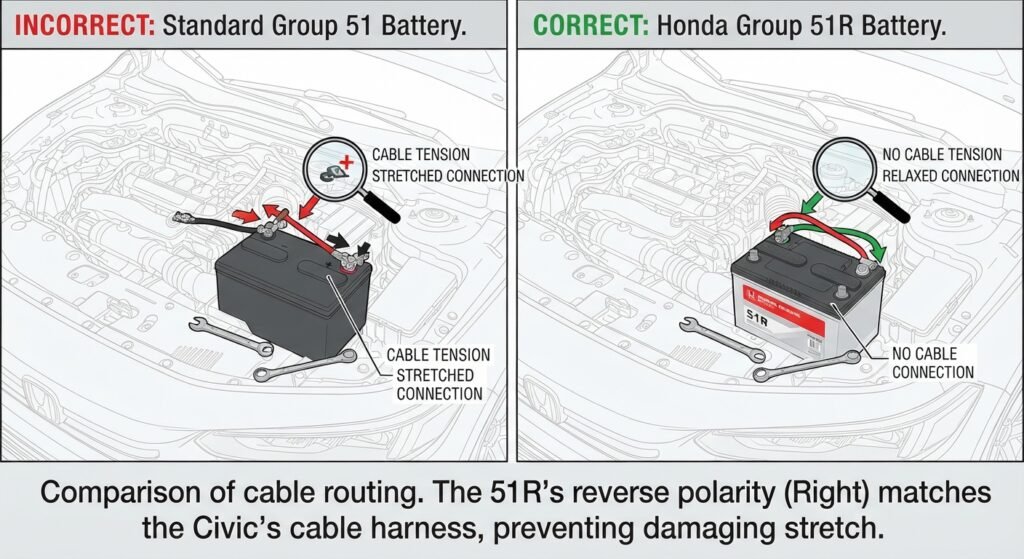
If you install a standard Group 51 battery where a 51R belongs, the terminals end up on the wrong sides. Your positive and negative cables would then have to stretch across the top of the battery to reach their matching post.
That stretching puts constant tension on the cables and the connectors attached to them. Over time, this tension can loosen connections, wear down cable insulation, or even snap a terminal clamp.
A properly matched Group 51R battery lets every cable sit exactly where the manufacturer intended. There is no reaching, no twisting, and no added strain on the electrical system.
Choosing the correct polarity is not just a minor technical detail. It protects your wiring harness, keeps your connections secure, and helps your electrical system perform the way Honda engineered it to.
Tools and Materials Needed for the Job
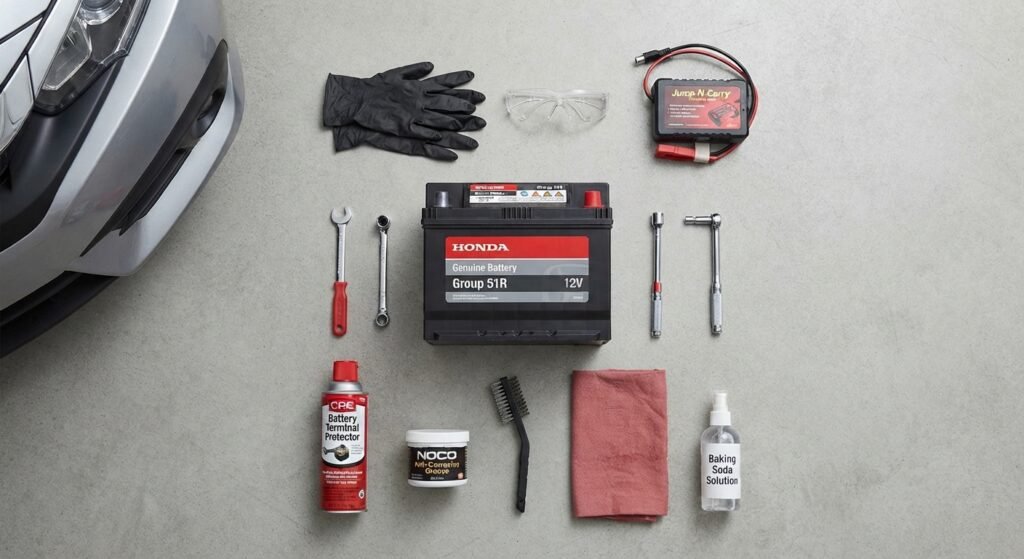
Before you get started, gather everything you need. Having your tools laid out ahead of time makes the whole process faster and safer.
Tools You Will Need
- A 10mm wrench or socket wrench
- Battery terminal cleaning brush or wire brush
- Protective gloves
- Safety glasses
- A small memory saver or backup power source (optional but recommended)
Materials to Have on Hand
- A new Group 51R battery rated for your specific Civic model year
- Terminal protector spray or anti corrosion grease
- A clean rag or shop towel
- Baking soda and water mixture for cleaning corrosion, if needed
A Quick Safety Reminder
Battery acid and the gases a battery can release are genuinely hazardous. Always work in a well ventilated area and keep your face away from the terminals while disconnecting or connecting cables.
Remove any jewelry, especially metal rings or bracelets, before you begin. Metal touching both terminals at once can create a dangerous short circuit.
Step-by-Step Honda Civic Group 51R Battery Replacement

Once your tools are ready, you can move through this swap in a handful of simple stages. Take your time on each step, especially the parts involving the terminals.
Step 1: Prepare the Vehicle
Park your Civic on a flat, level surface and turn off the engine completely. Engage the parking brake for extra safety.
Open the hood and locate the battery. On most Civic models, it sits toward the front of the engine bay on the passenger side.
Step 2: Disconnect the Old Battery
This is the most important safety step in the entire process. Always disconnect the negative terminal first.
The negative terminal is usually marked with a minus sign and often has a black cable attached. Loosen the nut with your wrench and gently wiggle the cable clamp free, then move it away from the terminal.
Once the negative cable is safely disconnected, repeat the process for the positive terminal. The positive terminal typically has a red cable and a plus sign marking.
Disconnecting negative first, then positive, prevents accidental sparking and short circuits while your wrench is near the metal body of the car.
Step 3: Remove the Hold Down Bracket
Most Civic batteries are secured with a hold down bracket or clamp near the base or top of the battery. Locate the bolts holding this bracket in place and remove them with your wrench.
Set the bracket and its bolts aside somewhere you will not lose them. You will need this same bracket to secure the new battery.
Step 4: Lift Out the Old Battery
Batteries are heavier than they look, often weighing between thirty and forty pounds. Use both hands and lift with your legs, not your back, to avoid strain.
Carefully lift the old battery straight up and out of the tray. Set it aside on a stable, flat surface away from the work area.
Step 5: Clean the Battery Tray and Terminals
Before placing the new battery, take a moment to clean the tray. Wipe away any dust, corrosion, or debris that has built up over time.
If you notice white or greenish buildup on the cable ends, use your wire brush or a baking soda and water mixture to clean it off. Clean terminals create a much stronger electrical connection.
Step 6: Install the New Group 51R Battery
Lower the new battery into the tray, making sure the terminals line up correctly with the reverse polarity layout. It should sit flush and level in the tray without wobbling.
Reattach the hold down bracket and tighten the bolts securely. A battery that shifts or vibrates while driving can wear down cables and terminals much faster.
Step 7: Reconnect the Cables in the Correct Order
This step reverses the order from removal. Always connect the positive terminal first.
Place the positive cable clamp onto the positive terminal and tighten it firmly with your wrench. Then move to the negative terminal and repeat the process.
Connecting positive first, then negative, keeps the risk of sparking to a minimum and protects your Civic’s sensitive electronics during the reconnection process.
Step 8: Final Check
Give both terminals a gentle tug to confirm they are tight and secure. Spray on some terminal protector if you have it, then close the hood.
Handling Post-Swap Resets and Dashboard Warnings
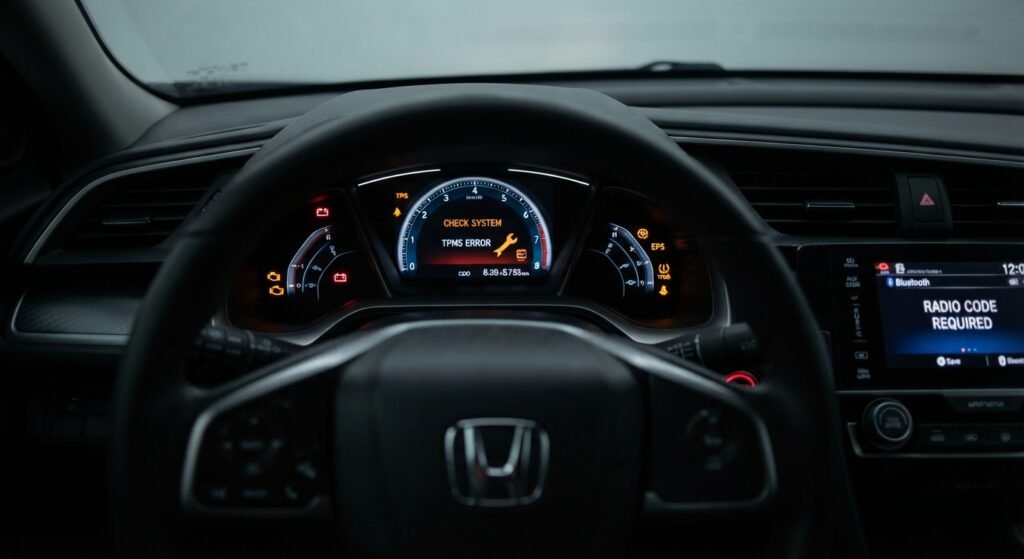
Once your new battery is installed, your Civic may act a little differently for the first few minutes of driving. This is completely normal and expected.
Radio Code and Infotainment Reset
Some older Civic models require a radio security code after the battery loses power. If your dashboard display asks for a code, check your owner’s manual or the original paperwork from when the car was purchased.
Newer Civic models with touchscreen infotainment systems usually reset on their own. You may just need to re-pair your phone through Bluetooth again.
Dashboard Warning Lights
It is common to see a check engine light, a battery light, or other warning icons appear briefly after a battery change. In most cases, these lights clear on their own after driving for ten to fifteen minutes.
This happens because your Civic’s computer needs to relearn certain settings now that it has fresh power. Idle adjustments, throttle position, and other small calibrations reset during this time.
If a warning light stays on well beyond a normal drive cycle, it is worth having the code checked with a scanner. It may be unrelated to the battery swap itself.
Clock and Window Settings
Your clock will likely need to be reset manually. Some Civic models also lose their auto up and down window memory, which can be reset by holding the window switch up for a few seconds after the door is closed.
Expert Tips to Make Your New Battery Last Longer

A little bit of maintenance goes a long way toward extending the life of your new Group 51R battery. These small habits can add real months, or even years, to its lifespan.
Keep the Terminals Clean
Corrosion buildup is one of the most common reasons batteries fail early. Check your terminals every few months and clean off any buildup you notice.
Avoid Short Trips Whenever Possible
Frequent short drives do not give your alternator enough time to fully recharge the battery. When you can, combine errands into longer trips to help maintain a full charge.
Limit Battery Drain When Parked
Avoid leaving interior lights, phone chargers, or accessories running while the engine is off. These small drains add up quickly and can shorten battery life significantly.
Never Substitute a Standard Group 51 Battery
It might be tempting to grab a standard Group 51 battery if it is cheaper or more available. Resist that temptation.
Because the terminal layout is reversed on the 51R, using a standard 51 forces your cables to stretch across the battery case to reach the opposite terminals. This constant tension can wear down connectors, loosen cable ends, and create long term electrical issues that are far more expensive to fix than the battery itself.
Have Your Charging System Tested
Every time you replace a battery, it is smart to have your alternator and charging system tested. A weak alternator can drain even a brand new battery within a matter of months.
Frequently Asked Questions

How often does a Honda Civic need a new Group 51R battery?
Most batteries last between three and five years, depending on climate, driving habits, and maintenance. Hot climates tend to shorten battery lifespan.
Can I use a Group 51 battery instead of a 51R in my Civic?
No. The reversed terminal layout on the 51R exists for a reason, and using a standard 51 forces your cables to stretch, which can damage connectors over time.
Why did my radio ask for a code after the battery change?
Some Civic models have a security feature that locks the radio after it loses power. Check your owner’s manual for the reset code if this happens.
Is it normal for warning lights to stay on after installing a new battery?
Yes, briefly. Most lights clear within ten to fifteen minutes of driving as your Civic computer relearns its settings. If they persist, have the codes scanned.
Do I need to disconnect both terminals before removing the battery?
Yes. Always disconnect the negative terminal first, followed by the positive terminal, to reduce the risk of sparking or short circuits.
What size wrench do I need for a Civic battery swap?
Most Honda Civic battery terminals and hold down brackets use a 10mm nut, so a 10mm wrench or socket is usually all you need.