
The complete DIY reference for every generation, from the classic 51R to the modern H5 and LN2 batteries
If your Honda Civic is cranking slowly, clicking instead of starting, or throwing a battery warning light, you are not alone. Batteries are the single most common reason a perfectly good Civic refuses to start.
The good news is that replacing a Civic battery is one of the easiest jobs you can do in your own driveway. You just need to know which battery your specific generation uses, the right tools, and the correct order of operations.
This guide covers every Civic generation on the road today, from older models that use the classic 51R group size to newer trims that switched to H5 and LN2 batteries. We will also walk through a full negative-first removal and installation procedure, alarm-trigger precautions, and the resets your car needs afterward.
Quick Reference: Honda Civic Battery Sizes by Generation
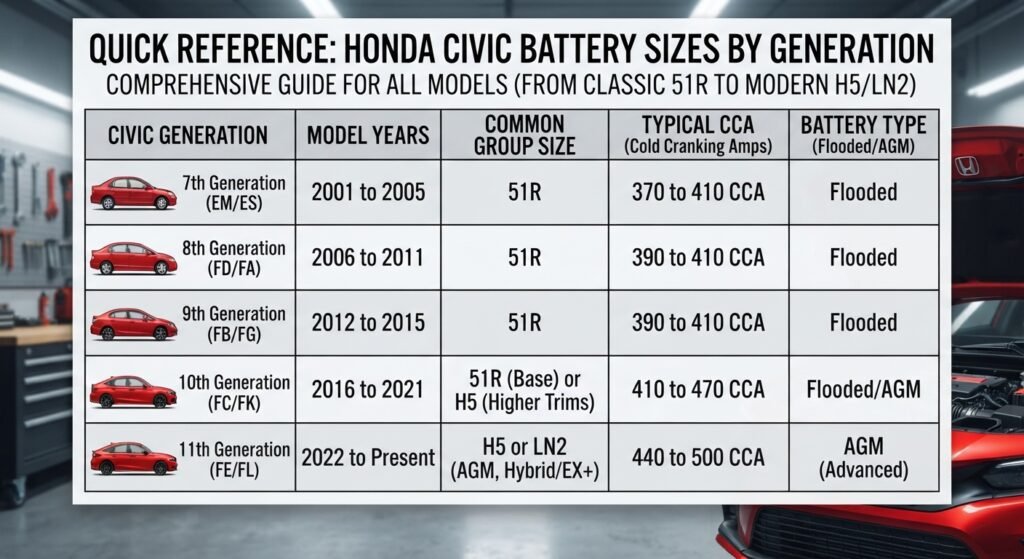
Use this table to find your battery group size fast. Always double check the label on your current battery, since trim level and options (like a turbo engine or a factory alarm) can change which battery Honda installed at the factory.
| Civic Generation | Model Years | Common Group Size | Typical CCA |
|---|---|---|---|
| 7th Generation | 2001 to 2005 | 51R | 370 to 410 CCA |
| 8th Generation | 2006 to 2011 | 51R | 390 to 410 CCA |
| 9th Generation | 2012 to 2015 | 51R | 390 to 410 CCA |
| 10th Generation | 2016 to 2021 | 51R (base) or H5 (higher trims) | 410 to 470 CCA |
| 11th Generation | 2022 to present | H5 or LN2 (AGM, hybrid/EX and above) | 440 to 500 CCA |
Understanding Group Sizes: 51R, H5, and LN2 Explained
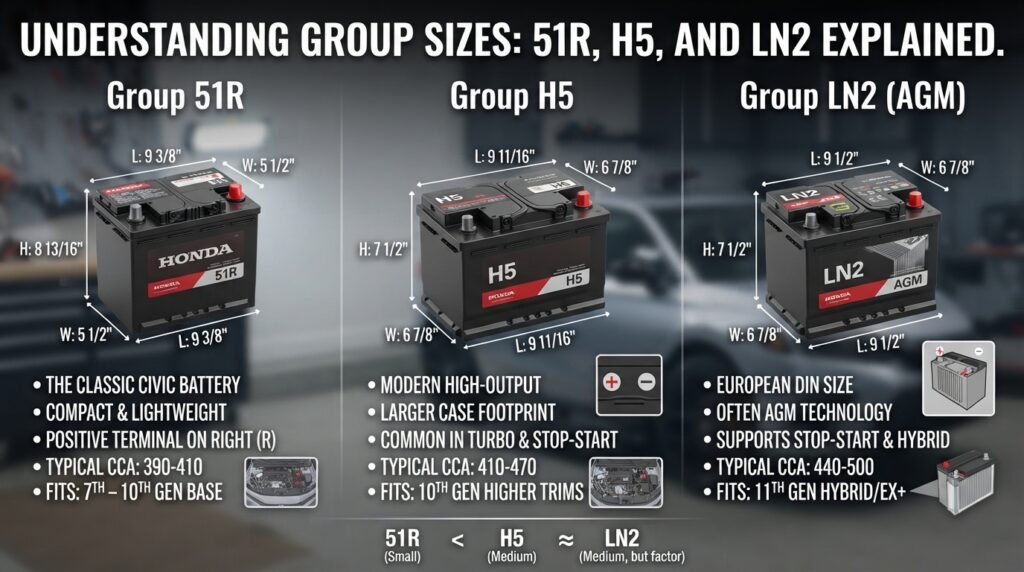
Battery “group size” is not a random label. It refers to a standardized case dimension, terminal layout, and hold-down configuration set by the Battery Council International (BCI).
Group 51R (the classic Civic battery)
The 51R has been Honda’s go-to battery for compact cars for over two decades. The “R” means the positive terminal is on the right side when the battery is facing you with the terminals up.
This is a compact, lightweight battery that fits Civics from the 7th generation all the way through most of the 10th generation base trims. It typically ranges from 390 to 410 cold cranking amps (CCA).
Group H5 (also labeled 94R or LN2 in some catalogs)
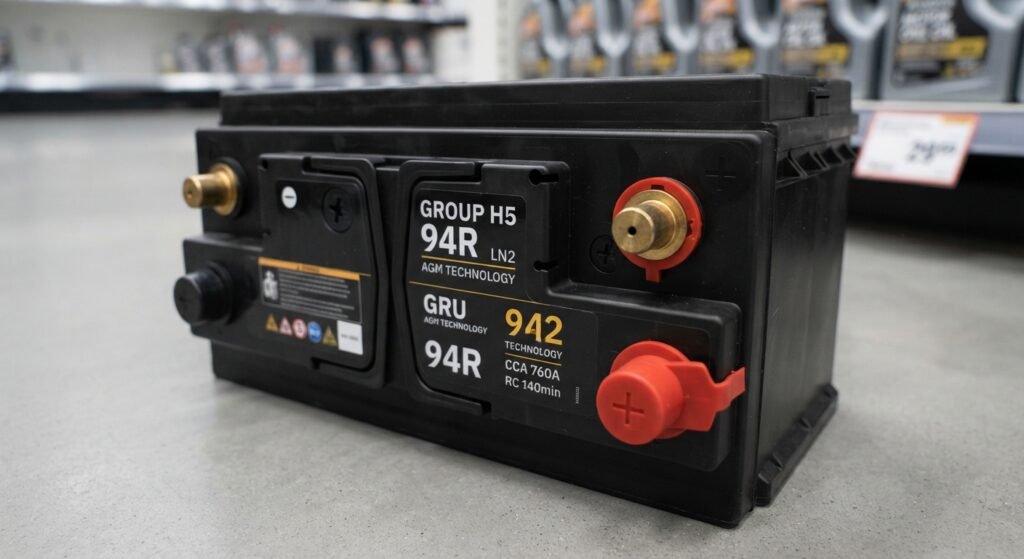
As Honda added more onboard electronics, idle stop-start systems, and turbocharged engines, some Civic trims needed a bigger, higher-output battery. That is where the H5 comes in.
H5 is the North American BCI group size, while LN2 is the European DIN size for a nearly identical case footprint. You will often see batteries labeled “H5/LN2” on the shelf at auto parts stores, since many manufacturers use one case for both markets.
H5/LN2 batteries are physically larger than a 51R and deliver more cranking power and reserve capacity, which matters for Civics with stop-start technology, turbo engines, or heavier factory electronics loads.
AGM versus flooded lead-acid
Many 11th generation Civics, especially Hybrid and higher trims with idle stop, come from the factory with an Absorbent Glass Mat (AGM) battery instead of a traditional flooded battery.
AGM batteries handle the frequent start-stop cycling of idle stop-start systems far better than flooded batteries, and they resist vibration damage. If your Civic came with an AGM battery, replace it with another AGM, not a cheaper flooded unit, or you risk premature failure and stop-start system faults.
Signs Your Civic Battery Needs Replacing
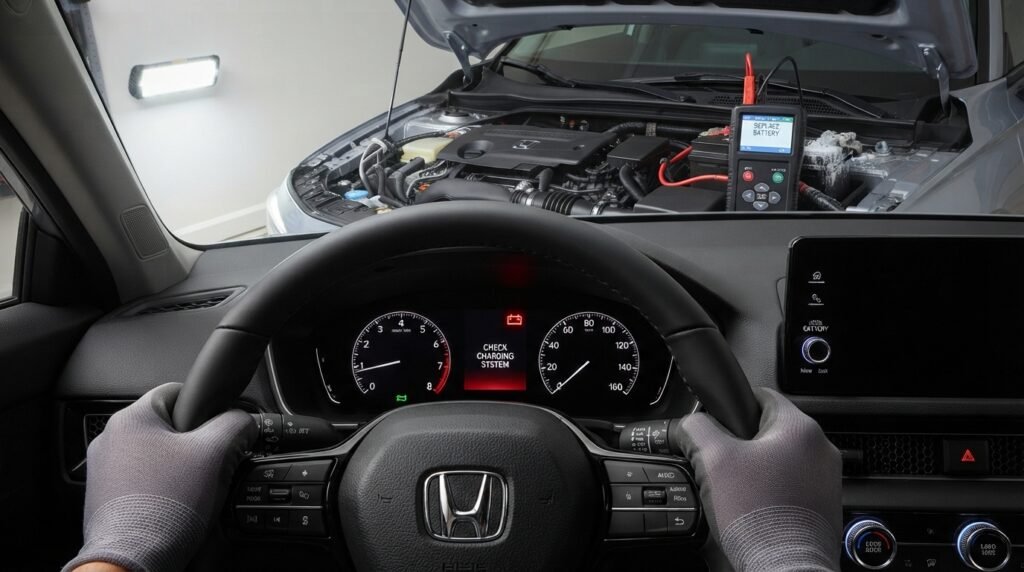
- Slow or labored cranking, especially in cold weather
- A single click or rapid clicking when you turn the key or press start
- Dashboard battery warning light or a “Battery Discharge” message on newer Civics
- Dim headlights or interior lights that brighten when you rev the engine
- A battery that is 3 to 5 years old and has never been replaced
- Corrosion buildup (white or bluish powder) on the terminals
Tools and Supplies You Will Need
This is a straightforward job, and most of these items are already in a basic home toolkit.
- 10mm socket and ratchet (most common terminal bolt size on Civics)
- Battery terminal wrench or a small adjustable wrench as a backup
- Battery terminal cleaning brush (a wire brush designed for posts and clamps)
- Anti-corrosion terminal grease or dielectric grease
- Insulated gloves and safety glasses
- A memory saver tool or a fully charged portable jump pack (optional, but highly recommended)
- A shop rag or paper towels for cleanup
- New battery matched to your Civic’s group size (51R, H5, or LN2/AGM as required)
Safety Tips and Alarm-Trigger Precautions

Before you touch a single bolt, take a few minutes to protect yourself and your car’s electronics.
| Important safety note: Car batteries produce hydrogen gas and contain corrosive sulfuric acid. Always wear safety glasses and gloves, work in a ventilated area, and never lean directly over the battery while disconnecting or connecting cables. |
Disconnecting a Civic’s battery can trigger a few side effects that surprise a lot of first-time DIYers. Here is what to expect and how to avoid a headache.
- The factory security alarm may sound briefly when the battery is disconnected or reconnected. This is normal on many Civics and usually stops on its own within a few seconds.
- If your Civic has an aftermarket alarm system, disarm it with your key fob before disconnecting the battery to prevent it from locking into a panic state.
- Removing power will reset your radio presets, clock, and sometimes a stored anti-theft radio code on older models. If your Civic’s radio requires a code, locate it before starting the job.
- Power windows and the sunroof may lose their auto-express (one-touch) function until you relearn them, which we cover in the resets section below.
- Using a memory saver device or a small jump pack connected through the 12V outlet or OBD-II port keeps constant power flowing so your presets and settings are retained.
Step-by-Step Battery Replacement Instructions
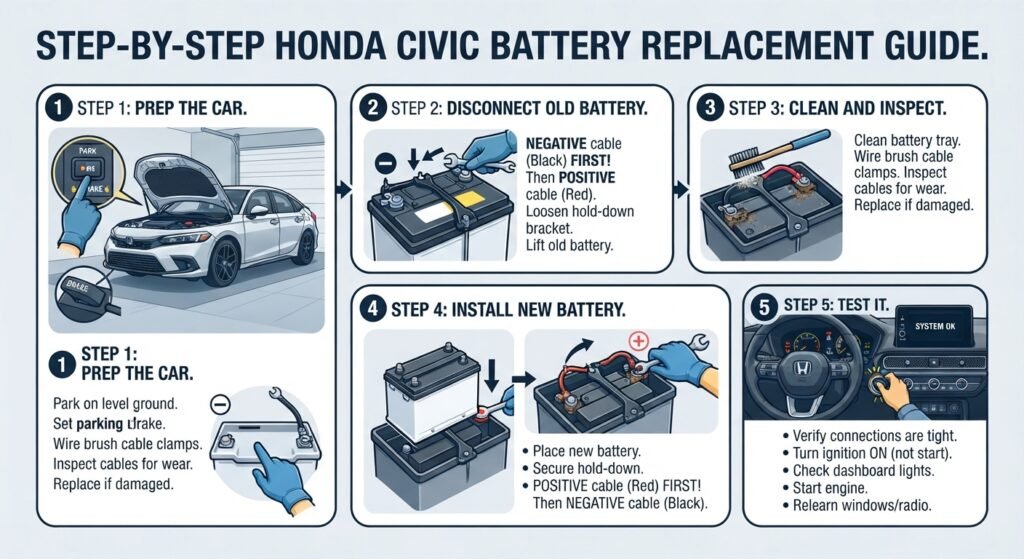
Follow this order exactly. The single most important rule in this entire guide is to disconnect the negative terminal first and reconnect it last.
Step 1: Prep the car
- Park on level ground, set the parking brake, and turn off the ignition completely.
- Open the hood and locate the battery. On most Civics it sits on the driver’s side of the engine bay; on some hybrid models it may be relocated to the trunk.
- If you are using a memory saver, plug it into the 12V outlet or OBD-II port now, before disconnecting anything.
Step 2: Disconnect the old battery (negative first)
- Locate the negative terminal. It is marked with a minus sign and is almost always connected to a black cable.
- Loosen the negative terminal bolt with your 10mm socket and gently wiggle the clamp off the post. Set the cable aside so it cannot swing back and touch the terminal.
- Now loosen and remove the positive terminal clamp, marked with a plus sign and typically wrapped in a red or clear plastic cover. Set it aside as well.
- Remove the battery hold-down bracket, usually a single bolt or clamp at the base or top of the battery.
- Carefully lift the old battery straight up and out. Batteries are heavy (30 to 45 pounds), so lift with your legs and keep it level to avoid spilling any acid.
Step 3: Clean and inspect
- Inspect the battery tray for corrosion or debris and wipe it clean.
- Use your terminal brush to clean both cable clamps until the metal is bright and free of white or bluish buildup.
- Check the hold-down bracket and cables for any cracking or fraying, and replace them if damaged.
Step 4: Install the new battery (positive first)
- Confirm the new battery is the correct group size (51R, H5, or LN2) and has the terminals oriented the same way as the old one.
- Lower the new battery into the tray and reinstall the hold-down bracket so the battery cannot shift while driving.
- Connect the positive terminal first this time, and tighten the clamp until it is snug with no wobble.
- Apply a light coat of anti-corrosion grease to both terminals.
- Connect the negative terminal last, and tighten it securely.
- Double check both connections are tight, then remove your memory saver if you used one.
Step 5: Test it
- Turn the ignition to the on position without starting the engine, and confirm the dashboard lights and infotainment screen power up normally.
- Start the engine and let it idle for a minute while you check for any warning lights.
- Test the headlights, horn, and power windows to confirm everything is functioning.
Post-Replacement Resets Your Civic Will Need
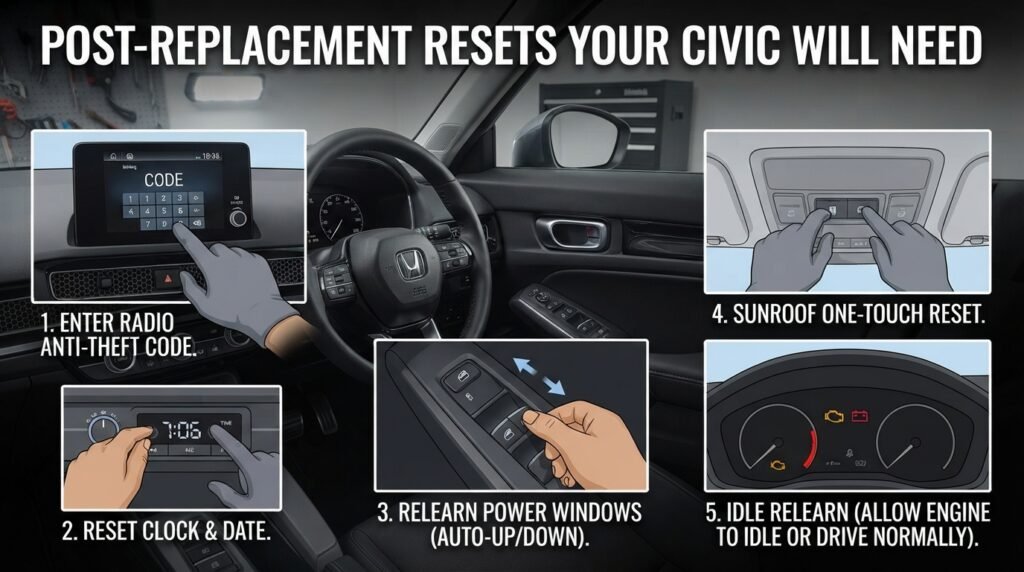
A fresh battery is only half the job. Most Civics need a few quick resets afterward to restore full functionality.
1. Radio and infotainment
If your radio display shows “CODE” or is locked, enter the anti-theft code you located earlier. If you did not save it, most Honda dealers can retrieve it using your vehicle’s VIN.
2. Clock and time settings
The clock will reset to a default time after a full disconnect. Reset it through the infotainment settings menu or the dedicated clock buttons, depending on your model year.
3. Power window auto-express relearn
This is the step most people forget. On most Civics, you relearn one-touch auto up and down like this:
- Turn the ignition on (engine can stay off).
- Fully close each window using the switch, then continue holding the switch up for about 2 seconds after the window is closed.
- Repeat for each window individually. Some models also require you to hold the switch down at the fully open position for a couple of seconds.
4. Idle relearn (some trims)
On certain Civics, especially turbocharged models, the engine control module needs a short idle relearn period. Simply letting the car idle for 5 to 10 minutes after startup, or taking a short drive, usually allows the computer to relearn on its own.
5. Sunroof one-touch reset (if equipped)
Open the sunroof fully using the switch, then hold the switch in the open direction for a few extra seconds after it stops moving. Close it the same way to restore one-touch function.
How to Choose the Right Replacement Battery
Getting the group size right is essential, but a few other specs matter too.
- Match or exceed the original CCA (cold cranking amps) rating for reliable starts in cold weather.
- If your Civic came with an AGM battery (common on Hybrid and idle stop-equipped trims), replace it with an AGM battery, not flooded lead-acid.
- Check the manufacture date sticker on any battery you buy. Fresher stock (within 6 months of production) will last longer.
- Look for at least a 3-year free replacement warranty, which most reputable brands offer on Civic-compatible batteries.
Frequently Asked Questions
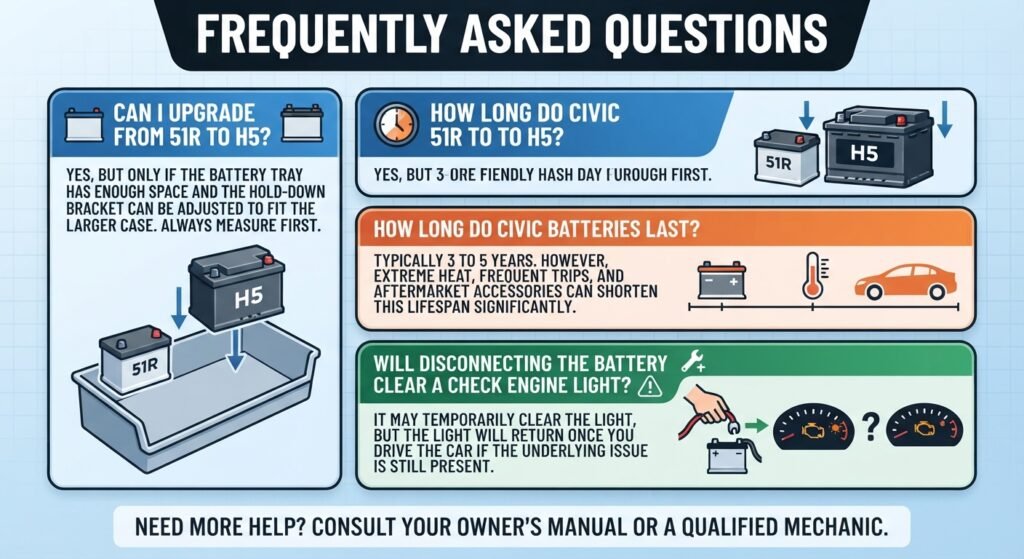
Can I put an H5 battery in a Civic that originally had a 51R?
Only if there is enough physical space and the hold-down bracket can be adjusted to fit the larger case. Many owners upgrade from 51R to H5 for extra cranking power, but always verify tray clearance before buying.
How long do Honda Civic batteries typically last?
Most last between 3 and 5 years, though extreme heat, frequent short trips, and aftermarket electronics can shorten that lifespan considerably.
Do I need to disconnect the battery for 10 minutes before removing it?
No, that step is unnecessary and outdated advice. Simply disconnect negative first, then positive, and you are ready to remove the battery immediately.
Will disconnecting the battery clear a check engine light?
It may temporarily clear the light, but if the underlying issue that triggered it is still present, the light will return once you drive the car.
Final Thoughts
Replacing your Honda Civic’s battery does not require a mechanic or a trip to the dealership. With the right group size in hand, a basic toolkit, and the negative-first, positive-first order followed correctly, most owners finish this job in under 30 minutes.
Take the extra few minutes afterward to relearn your power windows and check your radio code, and your Civic will feel and start exactly like it did the day it was new.