
Getting a clean launch in a front-wheel-drive manual sports car is an absolute art form. When you drop the hammer at the drag strip or a local autocross event, every single fraction of a second matters. The Honda Civic Si is an incredible platform for enthusiast drivers, but factory models come with a major limitation for competitive driving: they do not feature a traditional programmable launch control system right out of the box.
If you want to pin your RPMs at a specific threshold while staging on the starting line, you need to rely on aftermarket engine tuning. Finding the sweet spot for your launch control RPM setting is the key to dropping your zero-to-sixty times without destroying your drivetrain. This guide covers everything you need to know about setting up, configuring, and executing the perfect launch in your Civic Si.
Understanding How Civic Si Launch Control Works
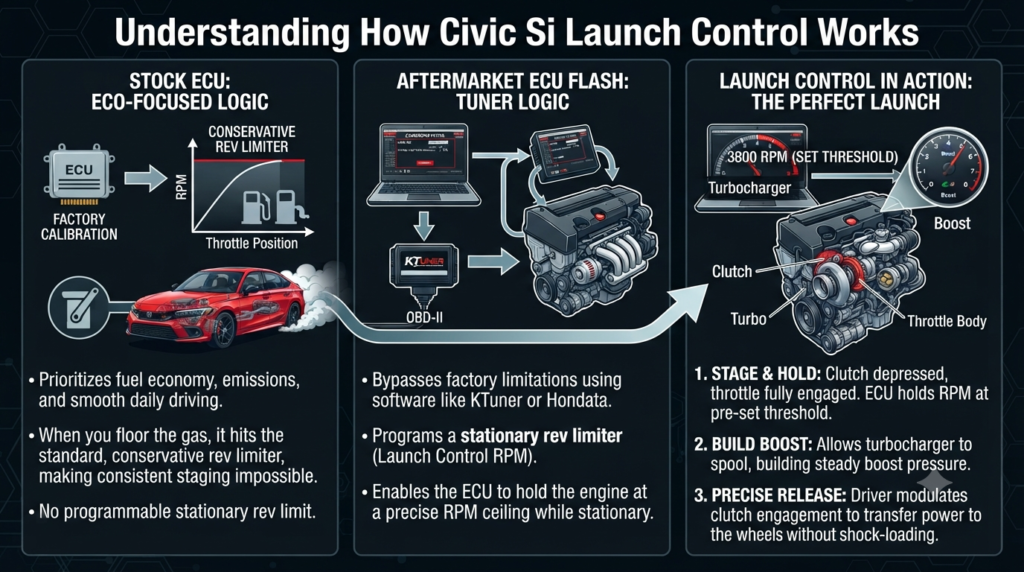
Modern factory ECUs prioritize fuel economy, emissions compliance, and smooth daily driving. Because of this, stock Civic Si models lack aggressive launch logic. When you floor the gas pedal in neutral or with the clutch depressed on a stock tune, the engine simply hits the standard redline or a conservative rev limiter, making consistent staging nearly impossible.
To bypass this limitation, enthusiasts use aftermarket ECU flash systems such as KTuner or Hondata FlashPro. These software suites allow you to program a stationary rev limiter. When your vehicle speed is at zero, the clutch pedal is depressed, and your throttle is fully engaged, the ECU holds the engine at your pre-set RPM ceiling. This allows you to build steady boost pressure and release the clutch with total consistency every single time.
Ideal Launch Control RPM Settings for Your Setup
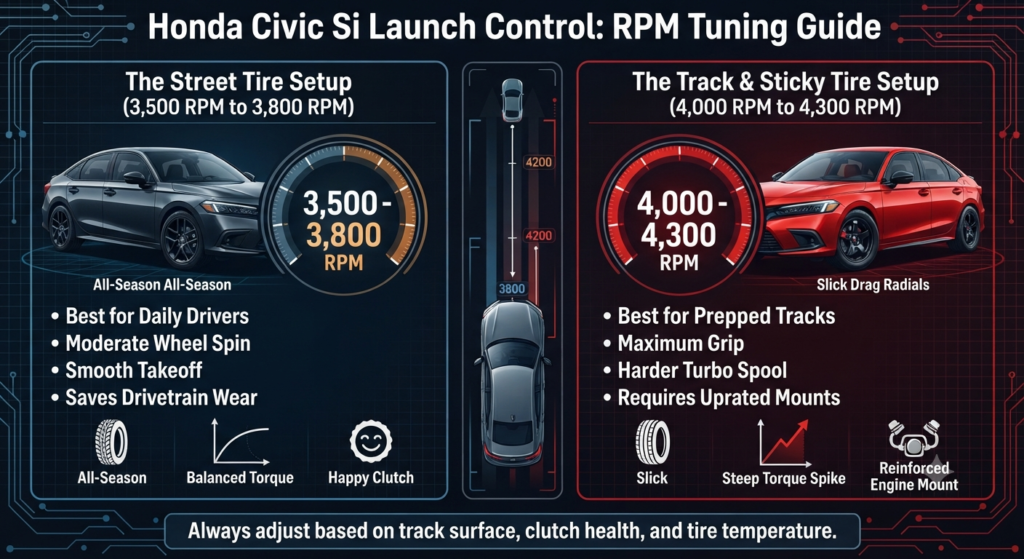
Choosing the right RPM limit depends heavily on your tire compound, track surface, and clutch condition. Setting the limit too high leads to violent wheel spin and wheel hop, while setting it too low causes the engine to bog down and lose all its momentum.
- The Street Tire Setup (3,500 RPM to 3,800 RPM):
Most daily-driven Civic Si owners run standard all-season or high-performance summer tires. These tires have limited traction on regular asphalt. Setting your launch control between 3,500 RPM and 3,800 RPM provides enough energy to get moving without instantly melting your tread. - The Track and Sticky Tire Setup (4,000 RPM to 4,300 RPM):
If you run drag radials or semi-slick tires at a prepped track, your tires can handle significantly more bite. You can raise your launch control setting up to the 4,000 RPM to 4,300 RPM range. This higher ceiling lets you spool the turbocharger harder before you dump the clutch, resulting in a much faster initial take off.
Warning: It might be tempting to max out your launch control past 4,500 RPM to chase low times. However, doing this on a stock clutch and factory axles usually results in severe shock-loading. You will likely experience violent wheel hop, glaze your clutch disc, or snap an axle shaft on your very first run.
Step-by-Step Guide to Configuring Launch Control via Ktuner or Hondata
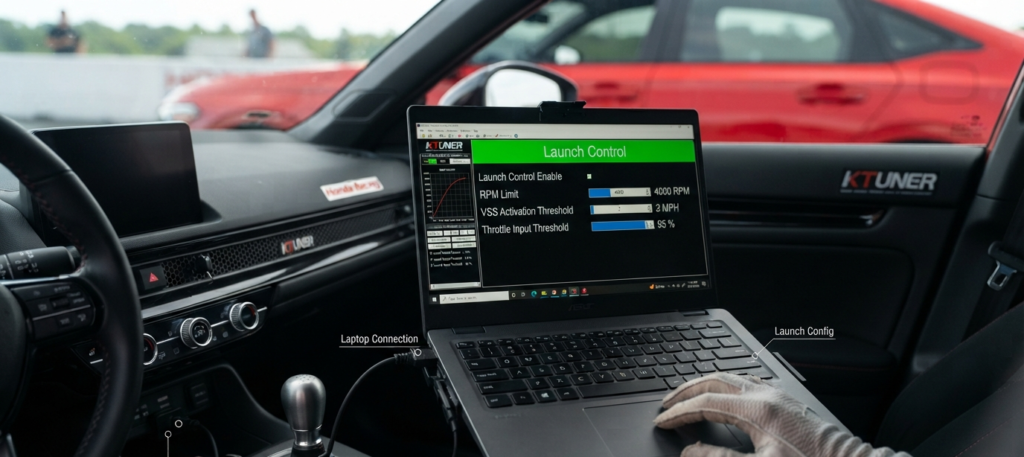
Setting up your launch parameters requires a laptop, your tuning software, and your interface cable. Always make sure your vehicle battery is fully charged before flashing any new maps to your ECU.
- Connect your flashing device directly to the OBD-II port under your dashboard.
- Open your tuning software and load your current base map.
- Navigate to the Main Adjustments or Misc Parameters tab where the launch control and speed limiter settings are located.
- Enable the stationary rev limiter feature.
- Input your desired RPM threshold based on the tire guidelines mentioned earlier.
- Set the vehicle speed activation threshold to one or two miles per hour so the system disengages the moment the car starts rolling.
- Optional: Enable on-the-fly adjustments if your tune supports it. This feature lets you use your steering wheel cruise control buttons to raise or lower your launch RPM in real time while sitting at the starting lights.
- Save your calibration file and flash it directly to your car.
Expert Techniques for Executing the Perfect Launch

Having the software configured is only half the battle. Mastering the physical technique requires practice and mechanical sympathy. Follow these steps to execute a clean launch every time:
- Warm up the car: Bring your engine oil and coolant up to proper operating temperatures before making any aggressive runs. Never launch a cold engine.
- Stage cleanly: Bring your car to the staging line and come to a complete stop. Depress the clutch pedal all the way to the floor and shift firmly into first gear.
- Engage the throttle: Mash the accelerator pedal straight to the floor. The engine will climb and hold steady right at your pre-set launch RPM limit, building minor turbo boost.
- Release with precision: When the staging lights drop, release the clutch pedal with a controlled slip technique. Do not just drop your foot off the pedal instantly. Let the clutch engage smoothly over a fraction of a second to transfer power to the wheels without shocking the transmission.
Addressing Community Pain Points and Common Mistakes
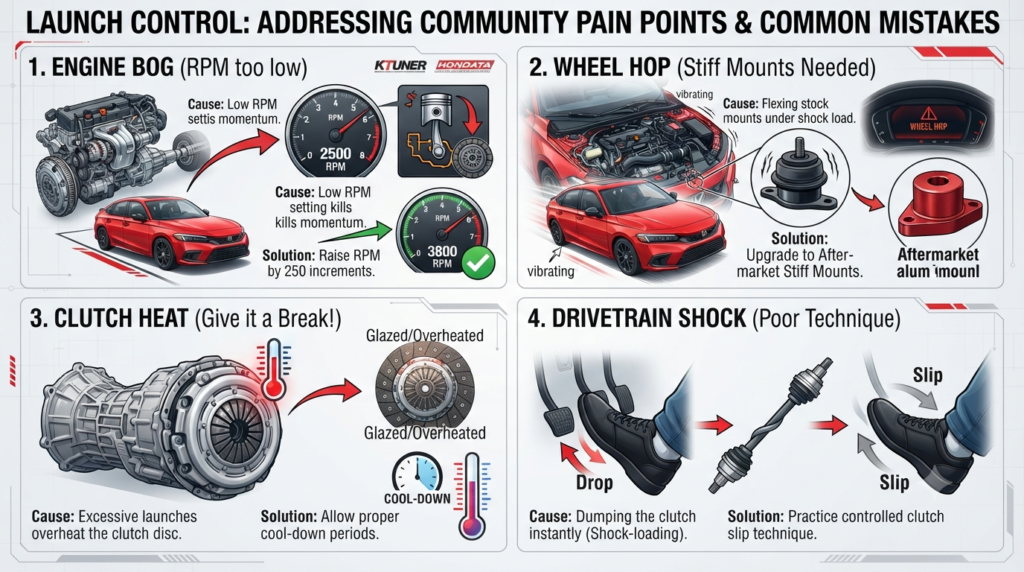
Many drivers run into frustrating issues when first experimenting with launch control. Here is how to solve the most common problems reported by Civic Si owners in online car communities:
- Fixing Engine Bog: If your car feels completely lifeless and dies down the moment you release the clutch, your RPM setting is too low for your current traction level. Try raising your launch control limit by 250 RPM increments until the car pulls cleanly out of the hole.
- Managing Wheel Hop: If your dashboard shakes violently when you launch, you are experiencing wheel hop. This is caused by the factory rubber engine and transmission mounts flexing under load. Upgrading to stiffer aftermarket motor mounts will keep your engine stable and put power straight to the pavement.
- Protecting Your Transmission: Using launch control frequently generates immense heat in your clutch assembly. Give your car a few minutes of normal driving between runs to let airflow cool down the transmission and clutch disc. Balancing aggressive driving with proper cool-down periods ensures your drivetrain lasts for years.
Conclusion
Tuning your Honda Civic Si with a proper launch control RPM setting transforms how the car performs off the line. By finding the right balance between 3,500 and 4,300 RPM based on your tire setup, you can eliminate frustrating lag and wheel spin. Take your time configuring your software, practice your clutch release technique, and always respect your car’s mechanical limits.