
Just finished an oil change in your driveway? You wipe the grease off your hands, slide back into the driver’s seat, and turn the key only to see that annoying oil life light staring right back at you.
Don’t panic. Your car isn’t broken; you just need to reset the maintenance minder system. The main hurdle is that Honda has moved this button around quite a bit over the years. What works on an older model won’t work on a newer vehicle.
This guide breaks down the exact location of the reset button for every single Honda Civic generation.
Understanding the Honda Maintenance Minder System
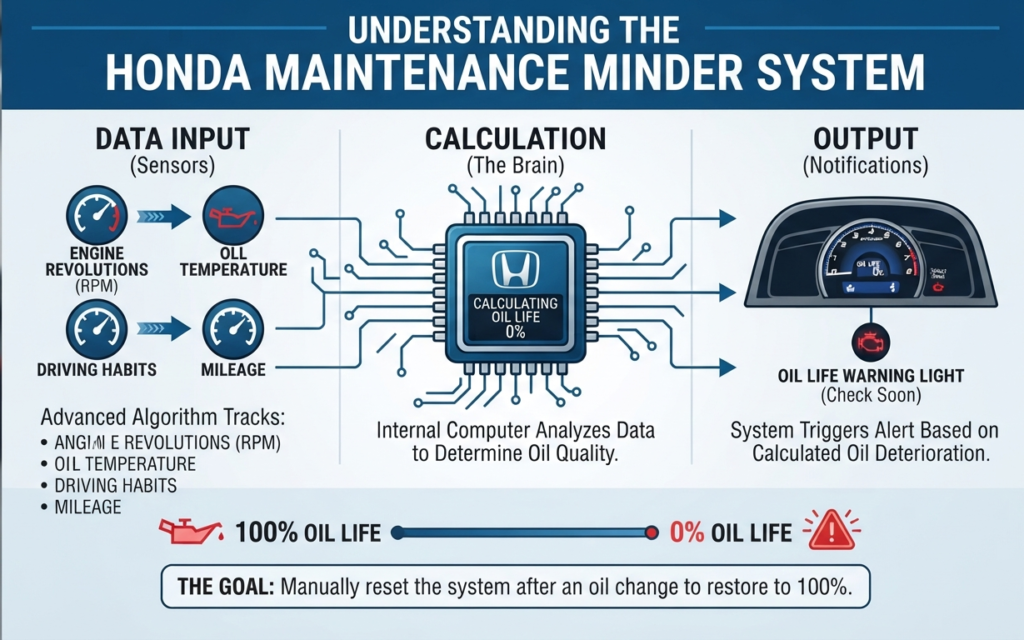
Honda doesn’t rely on a simple mileage sticker anymore. Your car uses an advanced internal computer algorithm that tracks engine revolutions, oil temperatures, and driving habits to calculate precisely when your oil loses its protective qualities.
When your oil life drops to zero percent, the dashboard triggers a warning light. Changing the oil is only half the job you must manually tell the computer system that fresh oil is inside, or the car will keep flashing warnings every time you start the engine.
8th Generation Honda Civics (2006–2011)
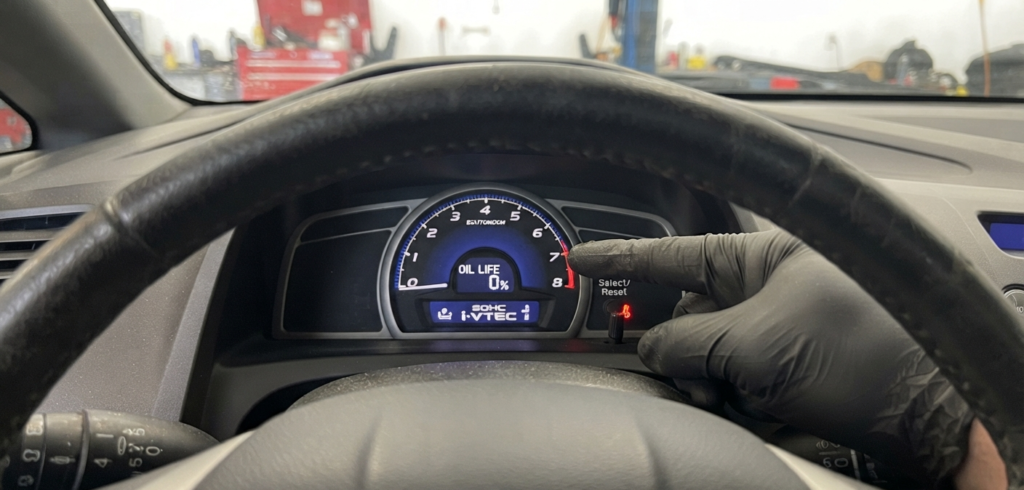
These models use a very old-school mechanical approach. You won’t find this button on the steering wheel. Instead, look directly at the clear plastic glass covering your speedometer and instrument cluster for the thin plastic stick poking out of the glass. This is your select and reset knob.
Step-by-Step Reset Instructions:
- Turn your ignition key to the ON position without starting the engine.
- Press the select and reset knob repeatedly until the screen displays your current oil life percentage.
- Press and hold that same knob down for about ten seconds until the oil life numbers start blinking.
- Release the knob for a split second, then press and hold it down again for another five seconds.
- The display will jump back to 100%. Turn off the ignition, and your reset is complete.
9th Generation Honda Civics (2012–2015)

For this generation, Honda moved the controls away from the instrument cluster. You will use the buttons mounted on the right side of your steering wheel along with the i-MID screen located in the center of your dashboard.
Step-by-Step Reset Instructions:
- Turn your ignition to the ON position.
- Press the Data or Menu button on your steering wheel.
- Use the directional up and down arrows to navigate the screen options, find the Vehicle Information menu, and press Enter.
- Scroll until you highlight Maintenance Info, then press Enter to open the submenu.
- Press and hold the Enter button for about ten seconds. The oil life indicator will reset back to 100% on the screen.
10th and 11th Generation Honda Civics (2016–Present)

Modern Civics feature fully digital instrument clusters and advanced steering wheel controls. You will use the touch-sensitive pads or rolling thumbwheel on the right spoke of your steering wheel.
Step-by-Step Reset Instructions:
- Turn your car into the ON mode without starting the engine.
- Use the left side of your steering wheel controls to navigate the main driver information interface until you find the Settings menu.
- Select Vehicle Settings using the scroll wheel or enter button.
- Find the Maintenance Minder option on the list and select Reset from the menu prompts.
- The screen will ask you to confirm your choice. Select Yes and press the wheel to finalize the reset.
Advanced Troubleshooting Your Oil Life Reset

Sometimes the car refuses to accept your reset attempt on the first try, usually due to a tiny procedural mistake.
- The Percentage Will Not Blink:
If the numbers refuse to flash on older models, you likely didn’t hold the button long enough. Turn the ignition off and restart the sequence from the beginning, making sure to hold the stick firmly without letting go early. - Wrong Ignition Position:
If your engine is fully running, the computer blocks the reset feature for safety reasons. Make sure your vehicle is in the accessory or ON mode, but keep the engine off. - Stubborn Maintenance Codes:
Sometimes resetting the oil life leaves a secondary sub-code on the screen. These require you to go through the vehicle settings menu a second time to clear tire rotations or filter checks.
Why Regular Maintenance Resets Matter

Ignoring your oil life monitor creates long-term problems for your engine. Even if you changed the oil on time, the car still thinks dirty fluid is running through the lines, causing inaccurate future maintenance warnings. Keeping your system synced ensures you never miss a vital service interval.
Conclusion
Resetting your oil light takes less than two minutes once you know where to look. Always take a moment to double-check your model year before pressing buttons. Proper maintenance tracking keeps your Honda Civic running smoothly for hundreds of thousands of miles.